GitHub에서 Github Actions란?
Github Actions 는 Github에 내장된 CI/CD 도구
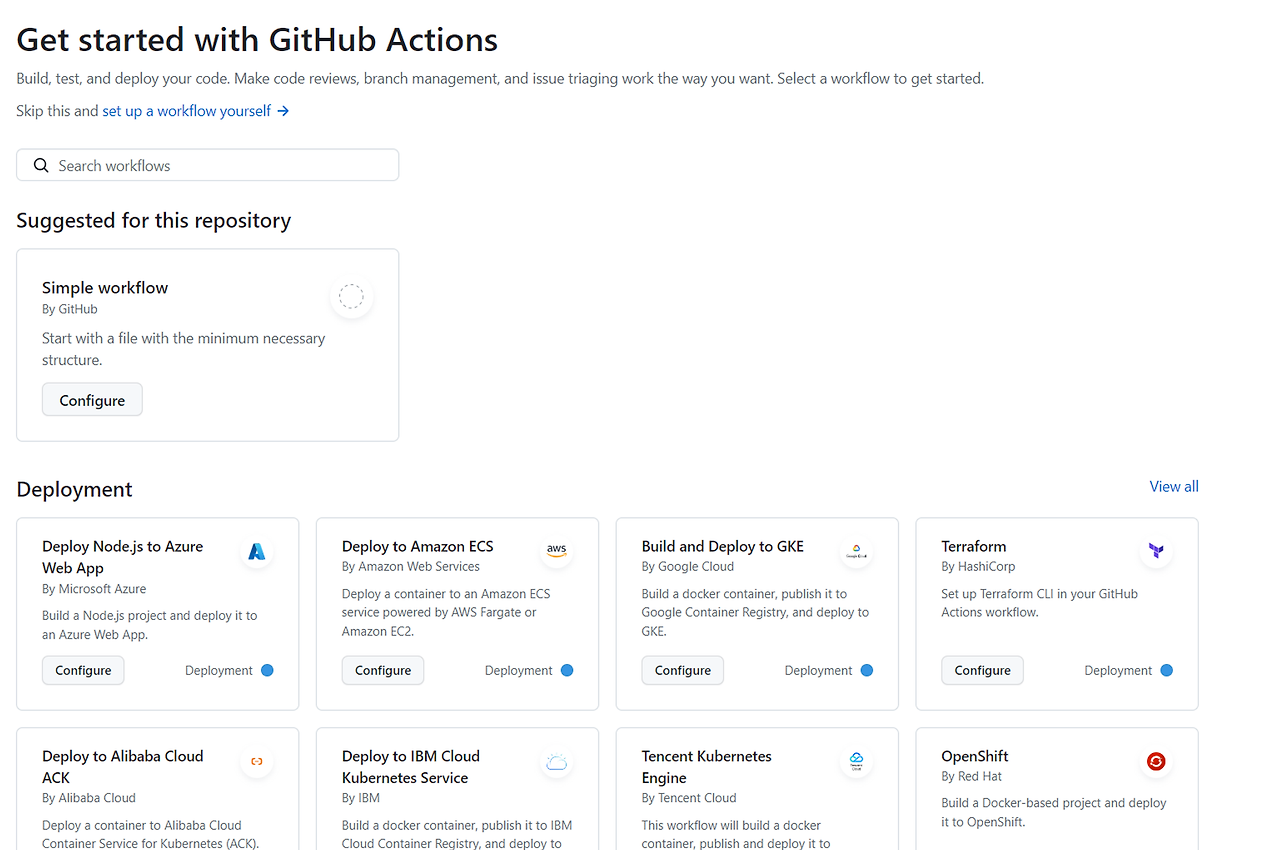
Github에 내장되어 있는 CI/CD라 github와 통합이 쉽고, CI/CD 서버가 내장 되어 CI/CD서버를 따로 구축할 필요 없으며, 일정 수준까지 가격이 무료.
무료 버전 : 스토리지 500MB, 월 2000분
Github Actions 동작 방법
repository의 .github/workflows 디렉토리에 필요한 Actions 파일들을 yaml 형식으로 작성
반드시 .github/workflows 폴더 아래에 YAML 파일이 위치
작성된 actions 파일들을 github에서 자동으로 실행
Github Actions 에서 CI란?
- Github Actions 의 CI
- test를 통과한 코드만 develop 브랜치와 main 브랜치에 merge되도록 하여 오류를 방지하고 안정적인 코드가 배포되고 버그를 빠르게 발견
- 활용 예
- develop 브랜치에 merge 된 경우, gradle test 를 진행
- feature/**(feature하위 ) 브랜치가 push 된 경우, gradle test 를 진행
- 만약 gradle test가 실패한 경우, slack 등 알림을 보내 코드를 수정하도록 개발자에게 안내
- 이메일은 자동으로 발송되도록 기본 설정
샘플 (실제 동작하지 않음)
# Actions 이름 github 페이지에서 볼 수 있다.
    name: 'CI'

    # Event Trigger 특정 액션 (Push, Pull_Request)등이 명시한 Branch에서 일어나면 동작을 수행한다.
on:
push:
    # 배열로 여러 브랜치를 넣을 수 있다.
branches: [ develop, feature/* ]
    # github pull request 생성시
    pull_request:
        branches:
            - develop # -를 쓴 여러 줄로 여러 브랜치를 명시하는 것도 가능

    # 실제 어떤 작업을 실행할지에 대한 명시
jobs:
  ci:
  # 스크립트 실행 환경 (OS)
  # 배열로 선언시 개수 만큼 반복해서 실행한다. ( 예제 : 1번 실행)
    runs-on: [ ubuntu-latest ]

    # 실제 실행 스크립트
    steps:
      # uses는 github actions에서 제공하는 플러그인을 실행.(git checkout 실행)
      - name: checkout
        uses: actions/checkout@v4

      # with은 plugin 파라미터 입니다. (java 11버전 셋업)
      - name: java setup
        uses: actions/setup-java@v2
        with:
          distribution: 'adopt' # See 'Supported distributions' for available options
          java-version: '17'

      # run은 사용자 지정 스크립트 실행
      - name: run unittest
        run: |
          ./gradlew clean test
Github Actions에서 CD란?
배포를 자동화하는 작업을 기술해서 빠르고 간편하게 배포.
Github Actions 의 CD
Main 브랜치에 코드가 통합된 경우 운영 환경에 빠르게 배포할 수 있게 함
- main 브랜치에 merge된 경우, gradle test 를 실행
- main 브랜치의 코드 기준으로 jar 파일을 생성
- 생성된 jar파일을 특정 환경(AWS, GCP 등)에 배포
샘플(실제 동작하지 않음)
name: 'CD'

on:
push:
branches: [ main ]
jobs:
cd:
runs-on: [ ubuntu-latest ]

steps:
    - name: checkout
uses: actions/checkout@v4

      - name: java setup
uses: actions/setup-java@v3
with:
distribution: 'adopt' # See 'Supported distributions' for available options
java-version: '17'

    - name: run unittest
run: |
    ./gradlew clean test

      - name: deploy to heroku
uses: akhileshns/heroku-deploy@v3.12.12
with:
heroku_api_key: ${{secrets.HEROKU_API_KEY}}
heroku_app_name: "sampleapp-github-actions" #Must be unique in Heroku
heroku_email: "nbcdocker@proton.me"
Github Actions 뜯어보기
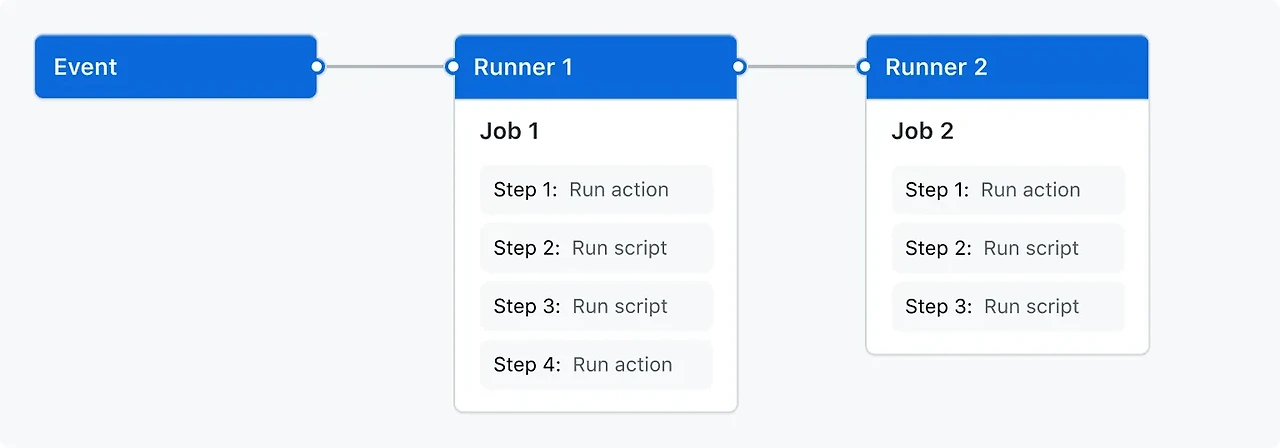
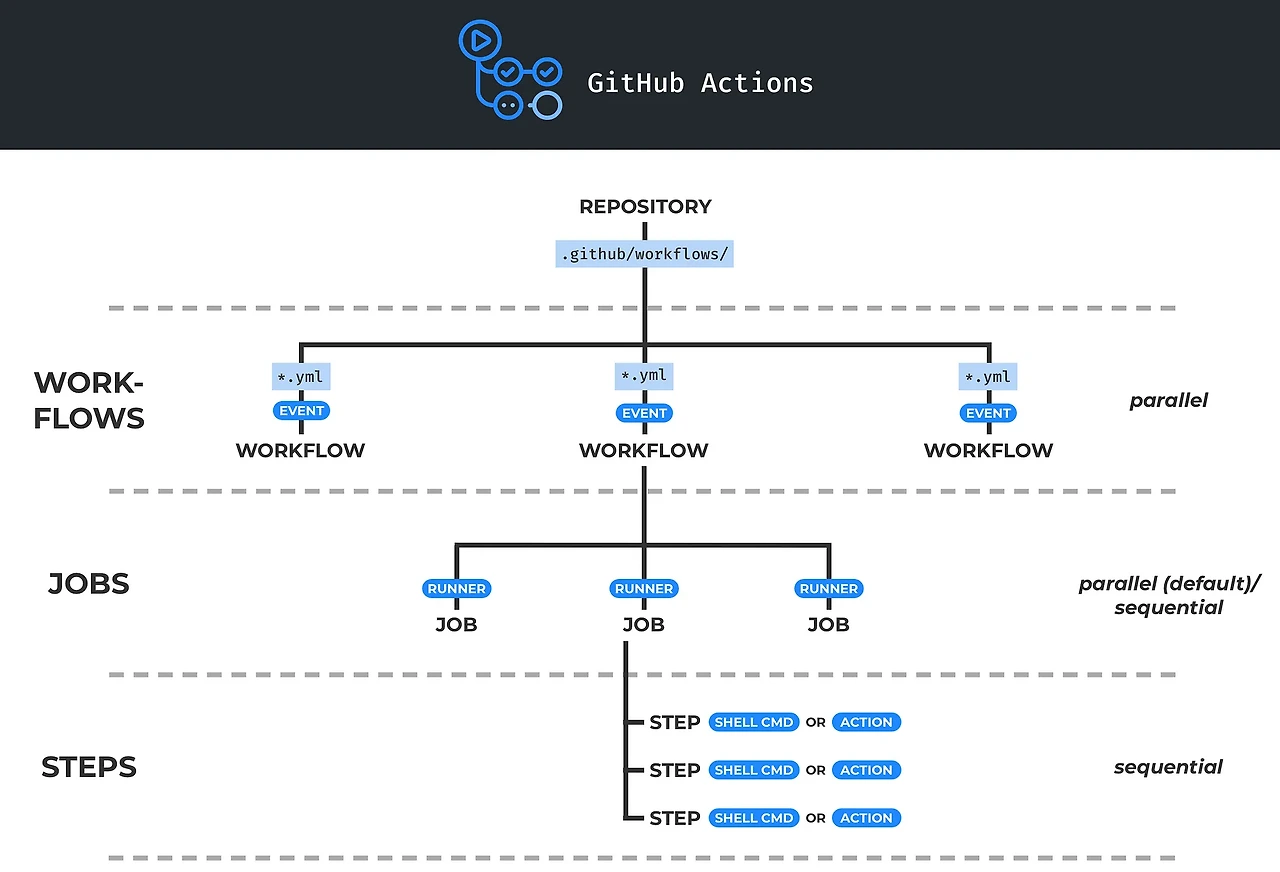
- Workflow
- 최상위 개념
- 여러 Job으로 구성되고, Event에 의해 트리거될 수 있는 자동화된 프로세스
- Workflow 파일은 YAML으로 작성되고, Github Repository의 .github/workflows 폴더 아래에 저장됨
- event
- Github Repository에서 발생하는 push, pull request open, issue open, 특정 시간대 반복(cron) 등의 특정한 규칙
- workflow 를 실행(trigger)함
- runner
- Github Action Runner app이 설치된 VM (virtual machine 이란뜻)
- Workflow가 실행될 instance로, 각각의 Job 들은 개별적인 runner에서 실행
- job
- 하나의 runner에서 실행될 여러 step의 모음을 의미
- step
- 실행 가능한 하나의 shell script 또는 action
- Actions
- Workflow의 가장 작은 단위로 재사용이 가능
- Job을 만들기 위해 Step들을 연결
workflow 뜯어보기
- name
- github actions의 이름을 정하는 부분
- on
- 이 action이 언제 실행되는지에 대한 부분
- jobs
실제 실행할 내용에 대한 부분
runs-on: 어떤 환경에서 실행하는지 기술
GitHub 호스팅 실행기 정보 - GitHub Docs
GitHub는 워크플로를 실행하는 호스팅 가상 머신을 제공합니다. 가상 머신에는 GitHub Actions에서 사용할 수 있는 도구, 패키지 및 설정 환경이 포함되어 있습니다.
docs.github.com
steps 실제 실행할 단계들을 기술
- name: 실행에 표시될 이름
- uses: 여러 가지 plugin 사용
- 다양한 action들을 사용 - https://github.com/marketplace?type=actions
GitHub Marketplace: actions to improve your workflow
Find the actions that help your team build better, together.
github.com
with: plugin 에서 사용할 파라미터들
run: 실제로 실행할 스크립트
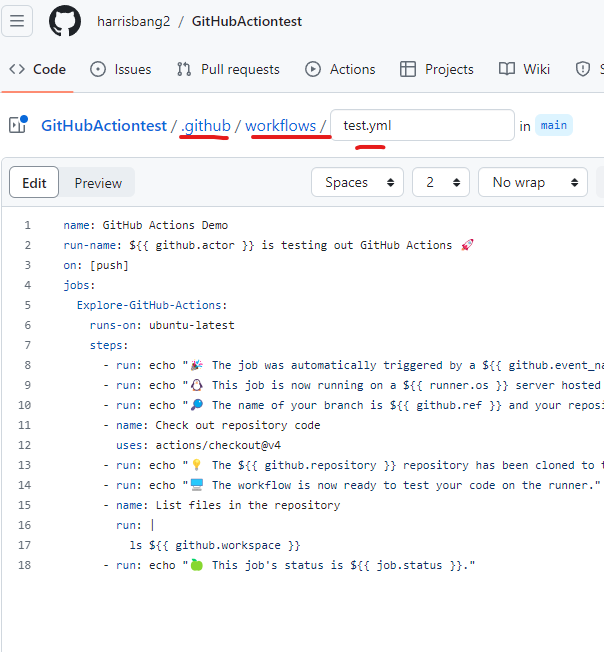
github actions 예제
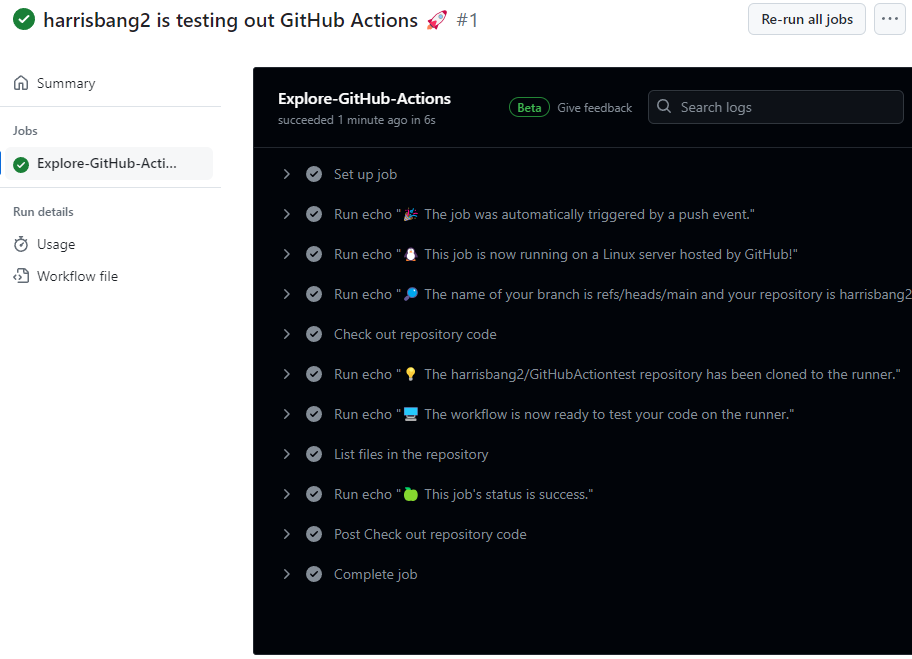
.github/workflows/github-actions-demo.yaml
name: GitHub Actions Demo
run-name: ${{ github.actor }} is testing out GitHub Actions 🚀
on: [push]
jobs:
Explore-GitHub-Actions:
runs-on: ubuntu-latest
steps:
    - run: echo "🎉 The job was automatically triggered by a ${{ github.event_name }} event."
    - run: echo "🐧 This job is now running on a ${{ runner.os }} server hosted by GitHub!"
    - run: echo "🔎 The name of your branch is ${{ github.ref }} and your repository is ${{ github.repository }}."
    - name: Check out repository code
uses: actions/checkout@v4
      - run: echo "💡 The ${{ github.repository }} repository has been cloned to the runner."
    - run: echo "🖥️ The workflow is now ready to test your code on the runner."
    - name: List files in the repository
run: |
ls ${{ github.workspace }}
    - run: echo "🍏 This job's status is ${{ job.status }}."
참고: https://github.com/nbcdocker/github-actions/tree/main
GitHub - nbcdocker/github-actions
Contribute to nbcdocker/github-actions development by creating an account on GitHub.
github.com
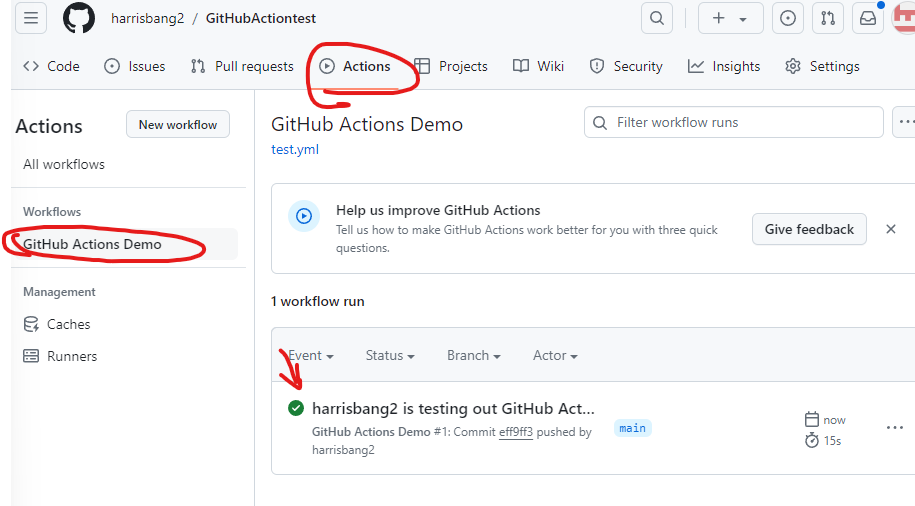
비어 있는 github repository를 만들고 위 데모를 push 해서 실행시켜봅시다!
'AWS > Docker+CICD' 카테고리의 다른 글
| CICD 파이프 라인 구축 2 (CD 구축 하기 Spring boot 를 사용해서) (1) | 2024.04.04 |
|---|---|
| CICD 파이프 라인 구축 1 (CI 구축 하기 Spring boot 를 사용해서) (0) | 2024.04.04 |
| 컨테이너 명령어 (1) | 2024.04.03 |
| 도커 컨테이너 랑 컨테이너 를 다루는 CLI. (0) | 2024.04.03 |
| Docker Image 관리, 로그인 (0) | 2024.04.03 |


