Spring
Spring 숙련 4 (회원가입 만들기)
sehunbang
2024. 1. 25. 19:33
// JPA
implementation 'org.springframework.boot:spring-boot-starter-data-jpa'
// MySQL
runtimeOnly 'com.mysql:mysql-connector-j'
추가
application properties
jwt.secret.key=7Iqk7YyM66W07YOA7L2U65Sp7YG065+9U3ByaW5n6rCV7J2Y7Yqc7YSw7LWc7JuQ67mI7J6F64uI64ukLg==
spring.datasource.url=jdbc:mysql://localhost:3306/auth
spring.datasource.username=root
spring.datasource.password={비밀번호}
spring.datasource.driver-class-name=com.mysql.cj.jdbc.Driver

spring.jpa.hibernate.ddl-auto=update

spring.jpa.properties.hibernate.show_sql=true
spring.jpa.properties.hibernate.format_sql=true
spring.jpa.properties.hibernate.use_sql_comments=true
추가
//
데이타 베이스 만들기
mysql 터미널에
mysql> create database auth;
그리고 인텔리 j 에 연결..
//
컨트롤러 두개 생성
@Controller
public class HomeController {

    @GetMapping("/")
    public String home(Model model) {
        model.addAttribute("username", "username");
        return "index";
    }
}
@Controller
@RequestMapping("/api")
public class UserController {

    @GetMapping("/user/login-page")
    public String loginPage() {
        return "login";
    }

    @GetMapping("/user/signup")
    public String signupPage() {
        return "signup";
    }
}
//
html 두개 생성
index.html
<!doctype html>
<html lang="en">
<head>
    <meta charset="UTF-8">
    <meta name="viewport"
          content="width=device-width, user-scalable=no, initial-scale=1.0, maximum-scale=1.0, minimum-scale=1.0">
    <meta http-equiv="X-UA-Compatible" content="ie=edge">
    <link rel="preconnect" href="https://fonts.gstatic.com">

    <link rel="stylesheet" href="/css/style.css">
    <script src="https://code.jquery.com/jquery-3.7.0.min.js" integrity="sha256-2Pmvv0kuTBOenSvLm6bvfBSSHrUJ+3A7x6P5Ebd07/g=" crossorigin="anonymous"></script>
    <script src="https://cdn.jsdelivr.net/npm/js-cookie@3.0.5/dist/js.cookie.min.js"></script>
    <script src="/js/basic.js"></script>
    <title>나만의 셀렉샵</title>
</head>
<body>
<div class="header" style="position:relative;">
    <div id="login-true" style="display: none">
        <div id="header-title-login-user">
            <span th:text="${username}"></span> 님의
        </div>
        <div id="header-title-select-shop">
            Select Shop
        </div>
        <a id="login-text" href="javascript:logout()">
            로그아웃
        </a>
    </div>
    <div id="login-false" >
        <div id="header-title-select-shop">
            My Select Shop
        </div>
        <a id="sign-text" href="/api/user/signup">
            회원가입
        </a>
        <a id="login-text" href="/api/user/login-page">
            로그인
        </a>
    </div>
</div>
</body>
</html>
sighup.html
<!DOCTYPE html>
<html lang="en" xmlns="http://www.w3.org/1999/xhtml" xmlns:th="http://www.thymeleaf.org">
<head>
    <meta charset="UTF-8">
    <meta name="viewport"
          content="width=device-width, user-scalable=no, initial-scale=1.0, maximum-scale=1.0, minimum-scale=1.0">
    <meta http-equiv="X-UA-Compatible" content="ie=edge">
    <link rel="preconnect" href="https://fonts.gstatic.com">
    <link rel="stylesheet" type="text/css" href="/css/style.css">
    <meta charset="UTF-8">
    <title>회원가입 페이지</title>
    <script>
        function onclickAdmin() {
            // Get the checkbox
            var checkBox = document.getElementById("admin-check");
            // Get the output text
            var box = document.getElementById("admin-token");

            // If the checkbox is checked, display the output text
            if (checkBox.checked == true){
                box.style.display = "block";
            } else {
                box.style.display = "none";
            }
        }
    </script>
</head>
<body>
<div id="login-form">
    <div id="login-title">Sign up Select Shop</div>

    <form action="/api/user/signup" method="post">
        <div class="login-id-label">Username</div>
        <input type="text" name="username" placeholder="Username" class="login-input-box">

        <div class="login-id-label">Password</div>
        <input type="password" name="password" class="login-input-box">

        <div class="login-id-label">E-mail</div>
        <input type="text" name="email" placeholder="E-mail" class="login-input-box">

        <div>
            <input id="admin-check" type="checkbox" name="admin" onclick="onclickAdmin()" style="margin-top: 40px;">관리자
            <input id="admin-token" type="password" name="adminToken" placeholder="관리자 암호" class="login-input-box" style="display:none">
        </div>
        <button id="login-id-submit">회원 가입</button>
    </form>
</div>
</body>
</html>
css 폴더랑 js 폴더 만들고 파일 넣지
style.css
* {
    font-family: 'Georgia', serif;
}

body {
    margin: 0px;
}

.header {
    height: 255px;
    box-sizing: border-box;
    background-color: #15aabf;
    color: white;
    text-align: center;
    padding-top: 80px;
    /*padding: 50px;*/
    font-size: 45px;
    font-weight: bold;
}

#header-title-login-user {
    font-size: 36px;
    letter-spacing: -1.08px;
}

#header-title-select-shop {
    margin-top: 20px;
    font-size: 45px;
    letter-spacing: 1.1px;
}

#login-form {
    width: 538px;
    height: 710px;
    margin: 70px auto 141px auto;
    display: flex;
    flex-direction: column;
    justify-content: flex-start;
    align-items: center;
    /*gap: 96px;*/
    padding: 56px 0 0;
    border-radius: 10px;
    box-shadow: 0 4px 25px 0 rgba(0, 0, 0, 0.15);
    background-color: #ffffff;
}

#login-title {
    width: 303px;
    height: 32px;
    /*margin: 56px auto auto auto;*/
    flex-grow: 0;
    font-family: SpoqaHanSansNeo;
    font-size: 32px;
    font-weight: bold;
    font-stretch: normal;
    font-style: normal;
    line-height: 1;
    letter-spacing: -0.96px;
    text-align: left;
    color: #212529;
}

#login-kakao-btn {
    border-width: 0;
    margin: 96px 0 8px;
    width: 393px;
    height: 62px;
    flex-grow: 0;
    display: flex;
    flex-direction: row;
    justify-content: center;
    align-items: center;
    gap: 10px;
    /*margin: 0 0 8px;*/
    padding: 11px 12px;
    border-radius: 5px;
    background-color: #ffd43b;

    font-family: SpoqaHanSansNeo;
    font-size: 20px;
    font-weight: bold;
    font-stretch: normal;
    font-style: normal;
    color: #414141;
}

#login-id-btn {
    width: 393px;
    height: 62px;
    flex-grow: 0;
    display: flex;
    flex-direction: row;
    justify-content: center;
    align-items: center;
    gap: 10px;
    /*margin: 8px 0 0;*/
    padding: 11px 12px;
    border-radius: 5px;
    border: solid 1px #212529;
    background-color: #ffffff;

    font-family: SpoqaHanSansNeo;
    font-size: 20px;
    font-weight: bold;
    font-stretch: normal;
    font-style: normal;
    color: #414141;
}

.login-input-box {
    border-width: 0;

    width: 370px !important;
    height: 52px;
    margin: 14px 0 0;
    border-radius: 5px;
    background-color: #e9ecef;
}

.login-id-label {
    /*width: 44.1px;*/
    /*height: 16px;*/
    width: 382px;
    padding-left: 11px;
    margin-top: 40px;
    /*margin: 0 337.9px 14px 11px;*/
    font-family: NotoSansCJKKR;
    font-size: 16px;
    font-weight: normal;
    font-stretch: normal;
    font-style: normal;
    line-height: 1;
    letter-spacing: -0.8px;
    text-align: left;
    color: #212529;
}

#login-id-submit {
    border-width: 0;
    width: 393px;
    height: 62px;
    flex-grow: 0;
    display: flex;
    flex-direction: row;
    justify-content: center;
    align-items: center;
    gap: 10px;
    margin: 40px 0 0;
    padding: 11px 12px;
    border-radius: 5px;
    background-color: #15aabf;

    font-family: SpoqaHanSansNeo;
    font-size: 20px;
    font-weight: bold;
    font-stretch: normal;
    font-style: normal;
    line-height: 1;
    letter-spacing: normal;
    text-align: center;
    color: #ffffff;
}

#sign-text {
    position:absolute;
    top:48px;
    right:110px;
    font-size: 18px;
    font-family: SpoqaHanSansNeo;
    font-size: 18px;
    font-weight: 500;
    font-stretch: normal;
    font-style: normal;
    line-height: 1;
    letter-spacing: 0.36px;
    text-align: center;
    color: #ffffff;
}

#login-text {
    position:absolute;
    top:48px;
    right:50px;
    font-size: 18px;
    font-family: SpoqaHanSansNeo;
    font-size: 18px;
    font-weight: 500;
    font-stretch: normal;
    font-style: normal;
    line-height: 1;
    letter-spacing: 0.36px;
    text-align: center;
    color: #ffffff;
}

.alert-danger {
    color: #721c24;
    background-color: #f8d7da;
    border-color: #f5c6cb;
}

.alert {
    width: 300px;
    margin-top: 22px;
    padding: 1.75rem 1.25rem;
    border: 1px solid transparent;
    border-radius: .25rem;
}
basic.js
let host = 'http://' + window.location.host;

$(document).ready(function () {
    const auth = getToken();
    if(auth === '') {
        window.location.href = host + "/api/user/login-page";
    } else {
        $('#login-true').show();
        $('#login-false').hide();
    }
})

function logout() {
    // 토큰 삭제
    Cookies.remove('Authorization', { path: '/' });
    window.location.href = host + "/api/user/login-page";
}

function getToken() {
    let auth = Cookies.get('Authorization');

    if(auth === undefined) {
        return '';
    }

    return auth;
}
엔티티랑 dto 만들기
User.java
package com.sparta.springauth.Entitiy;

import com.sparta.springauth.Entitiy.UserRoleEnum;
import jakarta.persistence.*;
import lombok.Getter;
import lombok.NoArgsConstructor;
import lombok.Setter;

@Entity
@Getter
@Setter
@NoArgsConstructor
@Table(name = "users")
public class User {
    @Id
    @GeneratedValue(strategy = GenerationType.IDENTITY)
    private Long id;

    @Column(nullable = false, unique = true)
    private String username;

    @Column(nullable = false)
    private String password;

    @Column(nullable = false, unique = true)
    private String email;

    @Column(nullable = false)
    @Enumerated(value = EnumType.STRING)
    private UserRoleEnum role;

    public User(String name,String password,String email, UserRoleEnum role){
        this.username=name;
        this.password = password;
        this.email = email;
        this.role =role;
    }
}
UserRoleEnum
package com.sparta.springauth.Entitiy;

public enum UserRoleEnum {
    USER(Authority.USER),  // 사용자 권한
    ADMIN(Authority.ADMIN);  // 관리자 권한

    private final String authority;

    UserRoleEnum(String authority) {
        this.authority = authority;
    }

    public String getAuthority() {
        return this.authority;
    }

    public static class Authority {
        public static final String USER = "ROLE_USER";
        public static final String ADMIN = "ROLE_ADMIN";
    }
}
SignupRequestDto
package com.sparta.springauth.DTO;

import lombok.Getter;
import lombok.Setter;

@Getter
@Setter
public class SignupRequestDto {
    private String username;
    private String password;
    private String email;
    private boolean admin = false;
    private String adminToken = "";
}
서비스 만들기
@Service
public class UserService {

    private final UserRepository userRepository;
    private final PasswordEncoder passwordEncoder;

    public UserService(UserRepository userRepository, PasswordEncoder passwordEncoder) {
        this.userRepository = userRepository;
        this.passwordEncoder = passwordEncoder;
    }

    // ADMIN_TOKEN
    private final String ADMIN_TOKEN = "AAABnvxRVklrnYxKZ0aHgTBcXukeZygoC";

    public void signup(SignupRequestDto requestDto) {
        String username = requestDto.getUsername();
        String password = passwordEncoder.encode(requestDto.getPassword());

        // 회원 중복 확인
        Optional<User> checkUsername = userRepository.findByUsername(username);
        if (checkUsername.isPresent()) {
            throw new IllegalArgumentException("중복된 사용자가 존재합니다.");
        }

        // email 중복확인
        String email = requestDto.getEmail();
        Optional<User> checkEmail = userRepository.findByEmail(email);
        if (checkEmail.isPresent()) {
            throw new IllegalArgumentException("중복된 Email 입니다.");
        }

        // 사용자 ROLE 확인
        UserRoleEnum role = UserRoleEnum.USER;
        if (requestDto.isAdmin()) {
            if (!ADMIN_TOKEN.equals(requestDto.getAdminToken())) {
                throw new IllegalArgumentException("관리자 암호가 틀려 등록이 불가능합니다.");
            }
            role = UserRoleEnum.ADMIN;
        }

        // 사용자 등록
        User user = new User(username, password, email, role);
        userRepository.save(user);
    }
}
Repository 만들기
public interface UserRepository extends JpaRepository<com.sparta.springauth.Entitiy.User,Long> {

    Optional<User> findByUsername(String username);
    Optional<User> findByEmail(String email);
}
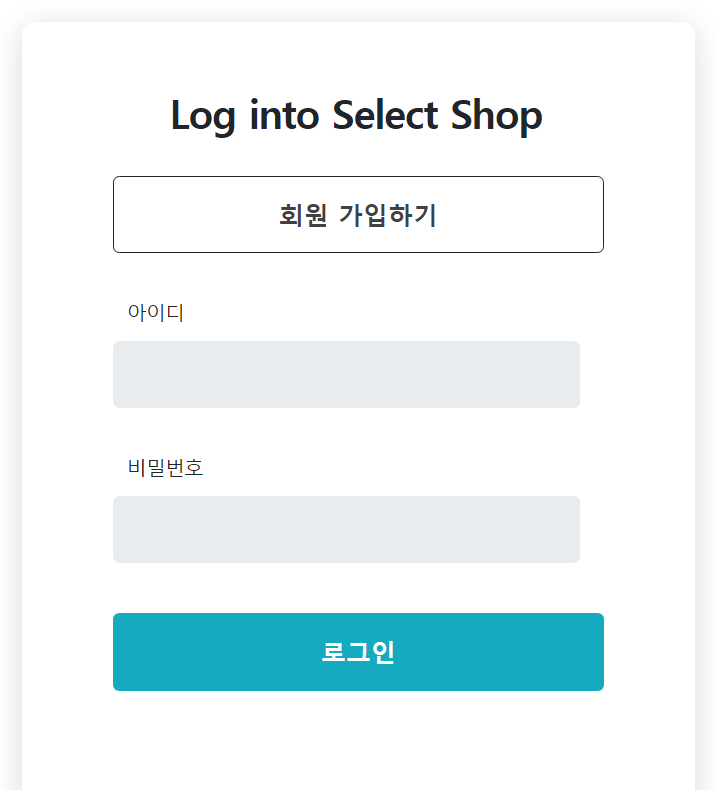
마지막에
컨트롤러 에 매핑 추가
@PostMapping("/user/signup")
public String sign(SignupRequestDto requestDto){
    userService.signup(requestDto);
    return "redirect:/api/user/login-page";
}