EC2 Purchasing option
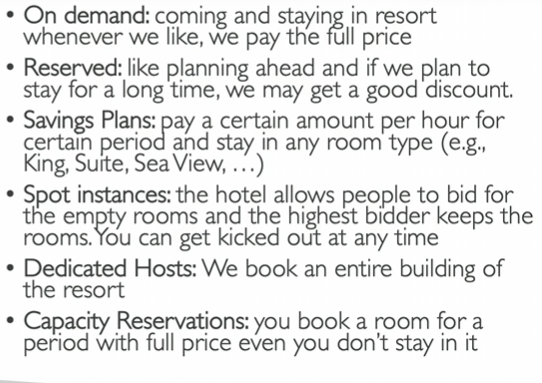
On-demand Instances - short workload, predictable pricing pay by second
Reserved (1 & 3 years)
- reserved instances - long workloads
- Convertible Reserved Instances - long workloads with flexible instances
Savings Plan (1 & 3 years) - commitment to an amount of usage, long workload
Spot Instances - short workload, cheap, can lose instances (less reliable)
Dedicated Hosts - book an entire physical server, control instance placement
Dedicated Instances - no other customers will share your hardware
Capacity Reservations - reserve capacity in a specific AZ for any duration
On-demand Instances
pay for what you use - Linux or windows - billing per second, after the first minute
all other Os - billing per hour
Has the higest cost but no upfront payment
No long-term commitment
Recommended for short-term and un-interrupted workloads, where you cant predit how the applocation will behave
EC2 Reserved (1 & 3 years)
- reserved instances - long workloads
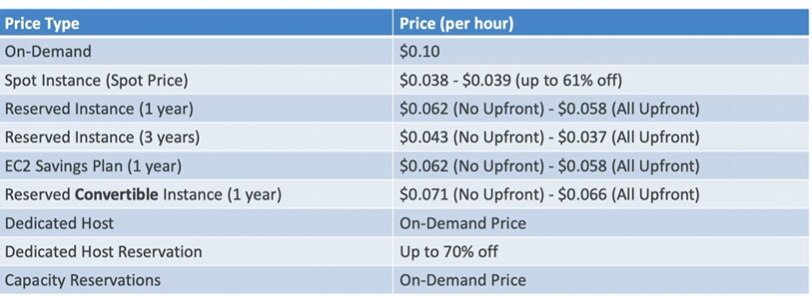
Up to 72% discount compare to On-demand
You reserve a specific instance attributes (Instance Type , Region, Tenancy, OS)
Reservation Period - 1 year (+ discount) or 3 years (+++ discount)
Payment Options - No Upfront (+ discount ), Partial Upfront (++ discount ), All Upfront (+++ discount )
reserved instances Scope - Regional or Zonal (reserve capacity in an AZ)
Recommended for steady-state usage applications (think database)
Can buy or sell in the reserved instance market
- Convertible Reserved Instances - long workloads with flexible instances
Can change the EC2 instace type, family, OS , Scope, tenancy
Up to 66% discount
Savings Plan (1 & 3 years)
Get a discount based on long-term usage (upto 72% - same as RIs)
Commit to a certain type of usage ($10/hour for 1 or 3 years)
Usage beyond EC2 Savings Plans is billed at the On-Demand price
Locked to a specific instance family & region (e,g M5 in us-east-l)
Flexible across:
- instance Size (m5.large -> m5.xlarge)
- OS (linux, windows ..)
- Tenancy (Host, Dedicated, Default)
Spot Instances
Can discount to 90%!
MOST cost Efficient instances in AWS
! instances that is "lose" at any point of time if the max price is less than the current spot price
Useful for workloads that are resilient to failure. ( 실패에 회복력이 있는 )
Batch jobs
Data analysis
Image processing
Distributed workloads
Workloads with a flexible start and end time
NOT SUITABLE FOR CRITICAL JOBS OR DATABASES
Dedicated Hosts
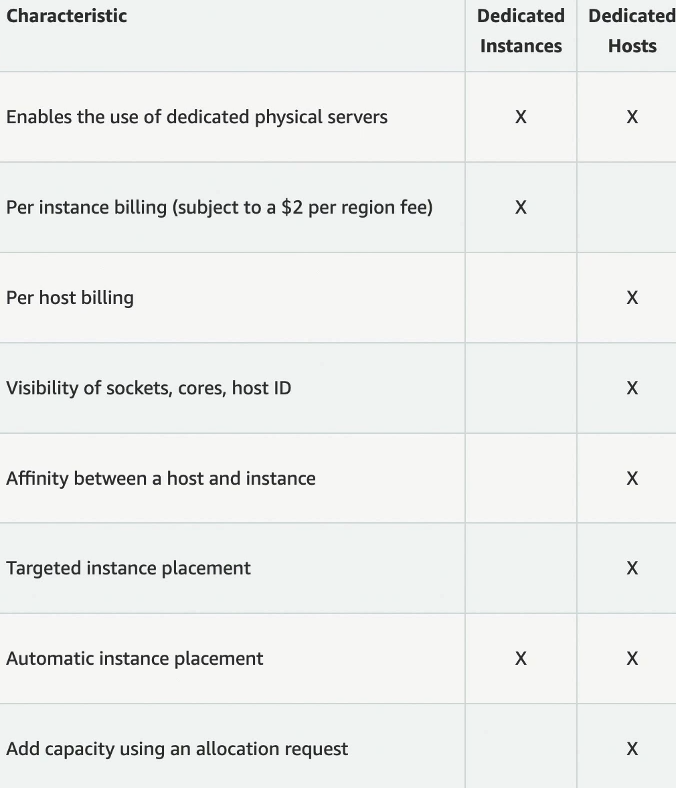
A physical server with EC2 instance capacity fully deficated to your user.
Allows you address compliance requirements and use your existing server-bound software licences (per-socket, per-core, per-VM software licenses)
Pyrchasing options :
- - pay per second for active Dedicated Host
- - Reserved - 1 or 3 years (No Upfront , Partial Upfront , All Upfront)
Most Expensive Option
Usedful for software that have complicated licensing model ( BYOL - Bring Your Own License)
Dedicated Instances
Instances tun on hardware that's deficated to you.
May share hardware with other instances in same accont
No control over instnce placement (can move hardware after Stop/Start)
Capacity Reservations
Reserve On-Demand instances capacity in a specific AZ for any duration
always have access to EC2 capacity when you need it.
No time commitment (create/cancel anytime you want)
No billing discount
Combine with Reginal Reserved Instances and Savings Plans to benefit from billing discounts
Charged at ON-Demand rate whether you run instances or not.
Suitable for Short-term, uninterrupted workloads that needs to be in a specific AZ.